Workflows overview
Workflows are pre-built UI experiences you can use to quickly and easily incorporate essential payroll functionality into your build, such as onboarding an employee or running payroll.
Available workflows
| Workflow | Description |
|---|---|
| Company onboarding | Guided flow to onboard a company to Gusto. |
| Information requests | Hub for responding to outstanding requests from Gusto. |
| Employee onboarding | Guided flow to onboard multiple employees, one at a time. |
| Employee self-onboarding | Guided flow for employee self-onboarding. |
| Employee dashboard | Hub for viewing and managing an employee's details. |
| Employee list | Hub for viewing and managing all employees, including onboarding new ones. |
| Employee termination | Guided flow to terminate an employee. |
| Contractor onboarding | Guided flow to onboard a contractor. |
| Contractor payments | Hub for managing contractor payments. |
| Payroll processing | Hub for running and managing payroll. |
| Payroll execution | Guided flow for a single payroll run. |
| Off-cycle payroll | Guided flow for off-cycle payroll. |
| Dismissal payroll | Guided flow for dismissal payroll. |
| Transition payroll | Guided flow for transition payroll. |
| Time off | Hub for managing time off policies and schedules. |
Why should I use a workflow?
Workflows are simple to add to your application. A single React component placed in your app can encapsulate an entire complex multi-step user experience.
How to use workflows
In this example, we incorporate the entire employee onboarding flow in our application. This component represents multiple steps, including inputting profile details, taxes, and payment info. You can implement it as follows:
import { EmployeeOnboarding, GustoProvider } from '@gusto/embedded-react-sdk'

function MyApp({ companyId }) {
  return (
    <GustoProvider
      config={{
        baseUrl: `/myapp/`,
      }}
    >
      <EmployeeOnboarding.OnboardingFlow companyId={companyId} onEvent={() => {...}} />
    </GustoProvider>
  )
}
This example renders a fully functional flow with the following steps:
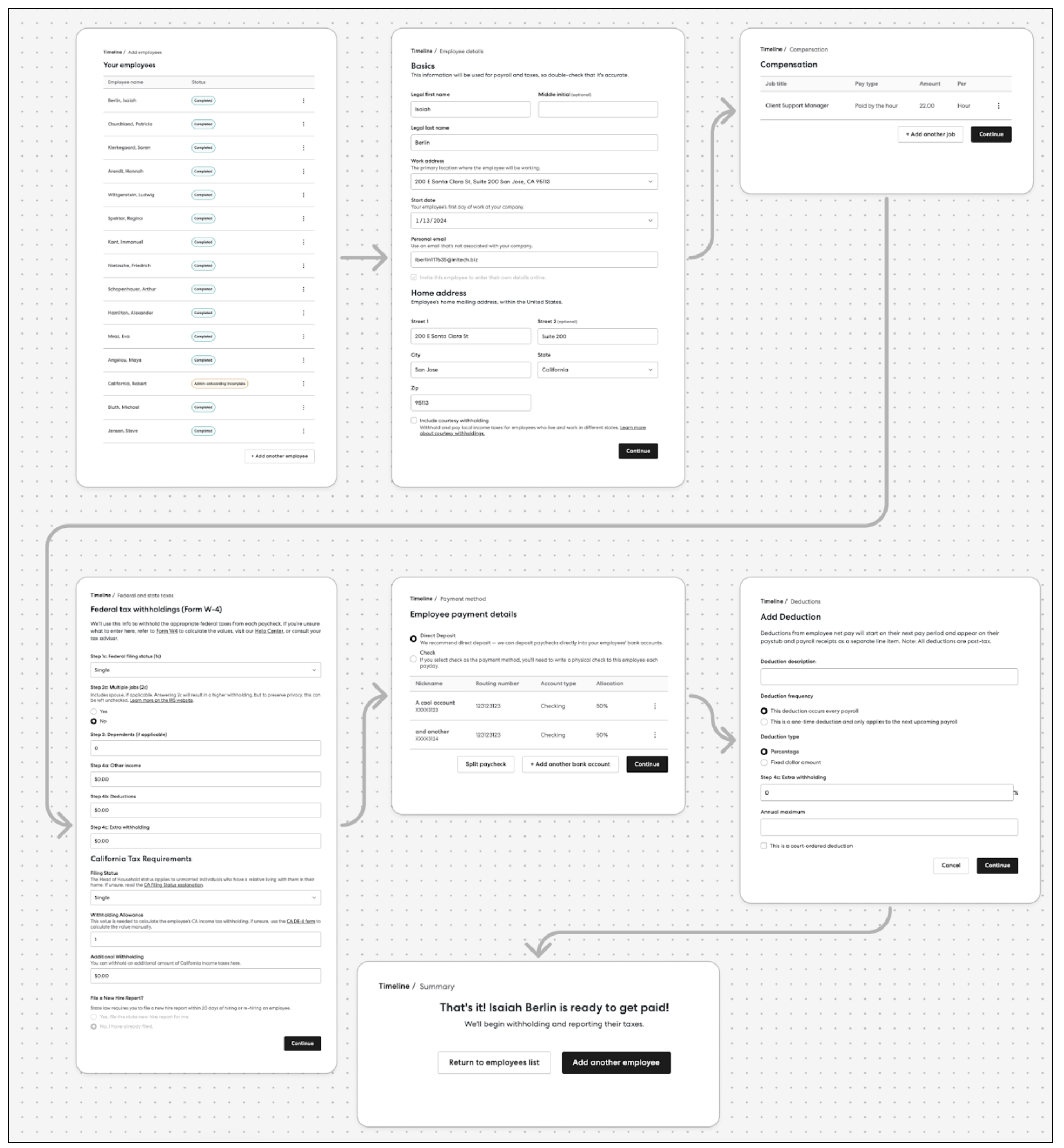
As you can see, workflow components let you implement complex flows in a simple way.
For detailed usage, props, events, and block references for each workflow, follow the links in the table above.